Showing posts with label reset. Show all posts
Showing posts with label reset. Show all posts
Tuesday, April 30, 2013
Xperia X8 Hard Reset simply method
To do a hard reset on Sony Ericsson Xperia X8 having Android operating system, you need to know that all data and third-party applications on the phone will be deleted. Mobile setting will return to the original including the lock code or security code. Follow these steps: 1. turn off the phone 2. press and hold left and right keys Beneath the LCD display 3. press and release the power key 4. follow the instructions that appear on the lcd screen to do a hard reset, and the phone will restart. | 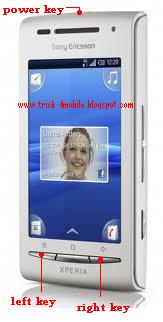 |

Thursday, April 11, 2013
How to Hard Reset Huawei U1100

There are two types of resetting and one is soft reset and another is hard reset. Soft reset can change your personal phone setting but hard reset can erase all data such all personal data and installed application. Hard reset can bring phone to its original state. Resetting can be called as many ways, Here I’ll show you how to reset Huawei U1100 . And some one ask as following ways: How to restore Huawei U1100 . How to factory reset Huawei U1100 . How to factory restore Huawei U1100 . How to format Huawei U1100 . How to master reset Huawei U1100 . How to soft reset Huawei U1100 . How to full reset Huawei U1100 . How to full restore Huawei U1100 . How to full erase Huawei U1100 . All Data Will Be Lost ! Back Up Your Data Before Doing Hard Reset.
Hard Hard Reset Huawei U1100
After fully charged Huawei U1100 battery and take the the sim card
On dialling screen of your Huawei U1100 type these code ##258741 then press call button.
** Do not hard reset if you really need it.
** Sometimes hard reset may damage your device permanently.
** Do not forget to back up your useful date before hard reset your Huawei U1100 because hard reset will erase all data from your phone including installed applications.
Sunday, April 7, 2013
How to Hard Reset HTC Wildfire S

Hard Reset Is a Resetting Technique Which Can Bring a Cell Phone To Its Original State When It Is Just Came From Factory; It Is Also Called Factory Resetting. There Are Many Reasons to Hard Reset a Cell Phone Such When a Cell Phone Becomes Very Slow, When Some Function Does Not Work, When Some Application Not Runs, When Some File Not Delete, When Application Not Uninstall And Many Unexpected Behavior By a Cell Phone.
HTC WILDFIRE S Factory Resetting:
1. From the Home screen, press applications and then tap Settings.
2. After above Tap Privacy > Factory data reset.
3. Now Tap Reset phone, and then tap Erase everything.
HARD RESETTING HTC WILDFIRE S BY BUTTON:
1. Take out the battery, stay for a few seconds, and then reinsert the battery.
2. Press and hold the VOLUME DOWN button, and after that briefly press the POWER button.
3. Stay for the screen with the three Android images to appear, and after that free the VOLUME DOWN button.
4. Press VOLUME DOWN to choose CLEAR STORAGE, and after that press the POWER button.
5 Press VOLUME UP to start the factory reset.
Important:
* Please Do Not Hard Reset Your Mobile without Any Unrecoverable Difficulty.
** Hard Reset Will Erase All User Data from Your HTC Wildfire S.
So Keep In Mind To Back Up Your Important Data Before Hard Reset.
*** Please Fully Charge Your Phone Battery before Hard Reset Because Any Power Failure May Damage Mobile Permanently.
****Some Times Reset Can Damage Your Mobile.
YOU MAY ALSO ASK HTC WILDFIRE S HARD RESET AS FOLLOWING:
HOW TO RESET HTC WILDFIRE S
HOW TO RESTORE HTC WILDFIRE S:
HOW TO FORMAT HTC WILDFIRE S:
HOW TO MASTER RESET HTC WILDFIRE S:
HOW TO FACTORY RESET HTC WILDFIRE S:
HOW TO HARD RESET HTC WILDFIRE S:
HOW TO FULL RESET A HTC WILDFIRE S:
HOW TO FULL RESTORE A HTC WILDFIRE S:
HOW TO MASTER RESTORE HTC WILDFIRE S:
HOW TO MASTER RESET HTC WILDFIRE S:
HOW TO FULL FACTORY RESET HTC WILDFIRE S:
HOW TO HARD FORMAT HTC WILDFIRE S:
Saturday, April 6, 2013
How to reset Nokia E71
 If you face some difficulty with your NOKIA E71 such it is very slow or it is hanging and NOKIA E71 shows any unexpected behavior.If there is a problem with any installed application such installed application is not work or is not supported by NOKIA E71 and which you cannot uninstall. When NOKIA E71 is not working properly or not responding quickly you may have to reset it. It is advisable to execute soft reset first and if soft reset could not solve your problem then you need to hard reset. Many cell phone company gives user the opportunity to hard reset their mobile by may way and many mobile users say hard reset as many names which described below.
HOW TO RESET A NOKIA E71 :
You May Call As:
HOW TO RESTORE A NOKIA E71 :
You May Call As:
HOW TO FORMAT NOKIA E71 :
You May Call As:
HOW TO MASTER RESET NOKIA E71 :
You May Call As:
HOW TO FACTORY RESET NOKIA E71 :
You May Call As:
HOW TO HARD RESET NOKIA E71 :
You May Call As:
HOW TO FULL RESET A NOKIA E71 :
You May Call As:
HOW TO FULL RESTORE A NOKIA E71 :
You May Call As:
HOW TO MASTER RESTORE NOKIA E71 :
You May Call As:
HOW TO MASTER RESET NOKIA E71 :
You May Call As:
HOW TO FULL FACTORY RESET NOKIA E71 :
You May Call As:
HOW TO HARD FORMAT NOKIA E71 :
You May Call As:
You May Call As:
HOW TO RESTORE A NOKIA E71 :
You May Call As:
HOW TO FORMAT NOKIA E71 :
You May Call As:
HOW TO MASTER RESET NOKIA E71 :
You May Call As:
HOW TO FACTORY RESET NOKIA E71 :
You May Call As:
HOW TO HARD RESET NOKIA E71 :
You May Call As:
HOW TO FULL RESET A NOKIA E71 :
You May Call As:
HOW TO FULL RESTORE A NOKIA E71 :
You May Call As:
HOW TO MASTER RESTORE NOKIA E71 :
You May Call As:
HOW TO MASTER RESET NOKIA E71 :
You May Call As:
HOW TO FULL FACTORY RESET NOKIA E71 :
You May Call As:
HOW TO HARD FORMAT NOKIA E71 :
You May Call As:
NOKIA E71 FACTORY RESETTING:
Soft resetting:
Soft resetting can restore Nokia E71 user setting and soft reset will not erase any data like image,sound,video.
Press *#7780# on the screen and after few seconds soft reset will start.
Hard resetting:
This option restores the original operating system from the rom. Formats the c: partition and deletes all data like picture,sound,video including any installed application.
Press *#7370# on the screen and after few seconds you may put the security code and resetting process will begin.
You can also achieve total reset by pressing and holding down following keys:
* + 3 + green button (call) immediately after turning the mobile on.
Important:
* Please do not reset your Nokia E71 without any unrecoverable difficulty.
** Hard reset will erase all user data from your Nokia E71.
So keep in mind to back up your important data before hard reset.
*** Please fully charge your Nokia E71 battery or plug in to charger before reset your Nokia E71 because any power failure may ruin your Nokia E71 permanently.
**** Some times reset can damage your Nokia E71.
Friday, April 5, 2013
HOW TO RESET NOKIA LUMIA 710 T
 If you face some difficulty with your NOKIA LUMIA 710 T such it is very slow or it is hanging and NOKIA LUMIA 710 T shows any unexpected behavior.If there is a problem with any installed application such installed application is not work or is not supported by NOKIA LUMIA 710 T and which you cannot uninstall. When NOKIA LUMIA 710 T is not working properly or not responding quickly you may have to reset it. It is advisable to execute soft reset first and if soft reset could not solve your problem then you need to hard reset. Many cell phone company gives user the opportunity to hard reset their mobile by may way and many mobile users say hard reset as many names which described below.
HOW TO RESET A NOKIA LUMIA 710 T :
You May Call As:
HOW TO RESTORE A NOKIA LUMIA 710 T :
You May Call As:
HOW TO FORMAT NOKIA LUMIA 710 T :
You May Call As:
HOW TO MASTER RESET NOKIA LUMIA 710 T :
You May Call As:
HOW TO FACTORY RESET NOKIA LUMIA 710 T :
You May Call As:
HOW TO HARD RESET NOKIA LUMIA 710 T :
You May Call As:
HOW TO FULL RESET A NOKIA LUMIA 710 T :
You May Call As:
HOW TO FULL RESTORE A NOKIA LUMIA 710 T :
You May Call As:
HOW TO MASTER RESTORE NOKIA LUMIA 710 T :
You May Call As:
HOW TO MASTER RESET NOKIA LUMIA 710 T :
You May Call As:
HOW TO FULL FACTORY RESET NOKIA LUMIA 710 T :
You May Call As:
HOW TO HARD FORMAT NOKIA LUMIA 710 T :
You May Call As:
You May Call As:
HOW TO RESTORE A NOKIA LUMIA 710 T :
You May Call As:
HOW TO FORMAT NOKIA LUMIA 710 T :
You May Call As:
HOW TO MASTER RESET NOKIA LUMIA 710 T :
You May Call As:
HOW TO FACTORY RESET NOKIA LUMIA 710 T :
You May Call As:
HOW TO HARD RESET NOKIA LUMIA 710 T :
You May Call As:
HOW TO FULL RESET A NOKIA LUMIA 710 T :
You May Call As:
HOW TO FULL RESTORE A NOKIA LUMIA 710 T :
You May Call As:
HOW TO MASTER RESTORE NOKIA LUMIA 710 T :
You May Call As:
HOW TO MASTER RESET NOKIA LUMIA 710 T :
You May Call As:
HOW TO FULL FACTORY RESET NOKIA LUMIA 710 T :
You May Call As:
HOW TO HARD FORMAT NOKIA LUMIA 710 T :
You May Call As:
NOKIA LUMIA 710 T FACTORY RESETTING:
RESET WITH SIMPLE STEPS:
* Tap on the Start Screen.
* Tap Setting > About Phone
* Tap Reset your Phone > Tap Yes
* Tap on the Start Screen.
* Tap Setting > About Phone
* Tap Reset your Phone > Tap Yes
Or
FOLLOW THE PICTURE TO HARD RESET Nokia Lumia 710 T
Important:
* Please do not reset your Nokia Lumia 710 T without any unrecoverable difficulty.
** Hard reset will erase all user data from your Nokia Lumia 710 T .
So keep in mind to back up your important data before hard reset.
*** Please fully charge your Nokia Lumia 710 T battery or plug in to charger before reset your Nokia Lumia 710 T because any power failure may ruin your Nokia Lumia 710 T permanently.
**** Some times reset can damage your Nokia Lumia 710 T .
HOW TO RESET NOKIA N97 MINI
HOW TO RESET NOKIA N96
HOW TO RESET NOKIA N95
Saturday, March 30, 2013
HOW TO RESET NOKIA 5800 XPRESSMUSIC
 If you face some difficulty with your NOKIA 5800 XPRESSMUSIC such it is very slow or it is hanging and NOKIA 5800 XPRESSMUSIC shows any unexpected behavior.If there is a problem with any installed application such installed application is not work or is not supported by NOKIA 5800 XPRESSMUSIC and which you cannot uninstall. When NOKIA 5800 XPRESSMUSIC is not working properly or not responding quickly you may have to reset it. It is advisable to execute soft reset first and if soft reset could not solve your problem then you need to hard reset. Many cell phone company gives user the opportunity to hard reset their mobile by may way and many mobile users say hard reset as many names which described below.
HOW TO RESET NOKIA 5800 XPRESSMUSIC :
You May Call As:
HOW TO RESTORE NOKIA 5800 XPRESSMUSIC :
You May Call As:
HOW TO FORMAT NOKIA 5800 XPRESSMUSIC :
You May Call As:
HOW TO MASTER RESET NOKIA 5800 XPRESSMUSIC :
You May Call As:
HOW TO FACTORY RESET NOKIA 5800 XPRESSMUSIC :
You May Call As:
HOW TO HARD RESET NOKIA 5800 XPRESSMUSIC :
You May Call As:
HOW TO FULL RESET A NOKIA 5800 XPRESSMUSIC :
You May Call As:
HOW TO FULL RESTORE A NOKIA 5800 XPRESSMUSIC :
You May Call As:
HOW TO MASTER RESTORE NOKIA 5800 XPRESSMUSIC :
You May Call As:
HOW TO MASTER RESET NOKIA 5800 XPRESSMUSIC :
You May Call As:
HOW TO FULL FACTORY RESET NOKIA 5800 XPRESSMUSIC :
You May Call As:
HOW TO HARD FORMAT NOKIA 5800 XPRESSMUSIC :
You May Call As:
You May Call As:
HOW TO RESTORE NOKIA 5800 XPRESSMUSIC :
You May Call As:
HOW TO FORMAT NOKIA 5800 XPRESSMUSIC :
You May Call As:
HOW TO MASTER RESET NOKIA 5800 XPRESSMUSIC :
You May Call As:
HOW TO FACTORY RESET NOKIA 5800 XPRESSMUSIC :
You May Call As:
HOW TO HARD RESET NOKIA 5800 XPRESSMUSIC :
You May Call As:
HOW TO FULL RESET A NOKIA 5800 XPRESSMUSIC :
You May Call As:
HOW TO FULL RESTORE A NOKIA 5800 XPRESSMUSIC :
You May Call As:
HOW TO MASTER RESTORE NOKIA 5800 XPRESSMUSIC :
You May Call As:
HOW TO MASTER RESET NOKIA 5800 XPRESSMUSIC :
You May Call As:
HOW TO FULL FACTORY RESET NOKIA 5800 XPRESSMUSIC :
You May Call As:
HOW TO HARD FORMAT NOKIA 5800 XPRESSMUSIC :
You May Call As:
NOKIA 5800 XPRESSMUSIC FACTORY RESETTING:
Soft resetting:
Soft resetting can restore Nokia 5800 XpressMusic user setting and soft reset will not erase any data like image,sound,video.
Press *#7780# on the screen and after few seconds soft reset will start.
Hard resetting:
This option restores the original operating system from the rom. Formats the c: partition and deletes all data like picture,sound,video including any installed application.
Press *#7370# on the screen and after few seconds you may put the security code and resetting process will begin.
You can also achieve total reset by pressing and holding down following keys:
* + 3 + green button (call) immediately after turning the mobile on.
Important:
* Please do not reset your Nokia 5800 XpressMusic without any unrecoverable difficulty.
** Hard reset will erase all user data from your Nokia 5800 XpressMusic.
So keep in mind to back up your important data before hard reset.
*** Please fully charge your Nokia 5800 XpressMusic battery or plug in to charger before reset your Nokia 5800 XpressMusic because any power failure may ruin your Nokia 5800 XpressMusic permanently.
**** Some times reset can damage your Nokia 5800 XpressMusic.
Subscribe to:
Posts (Atom)